Custom Form
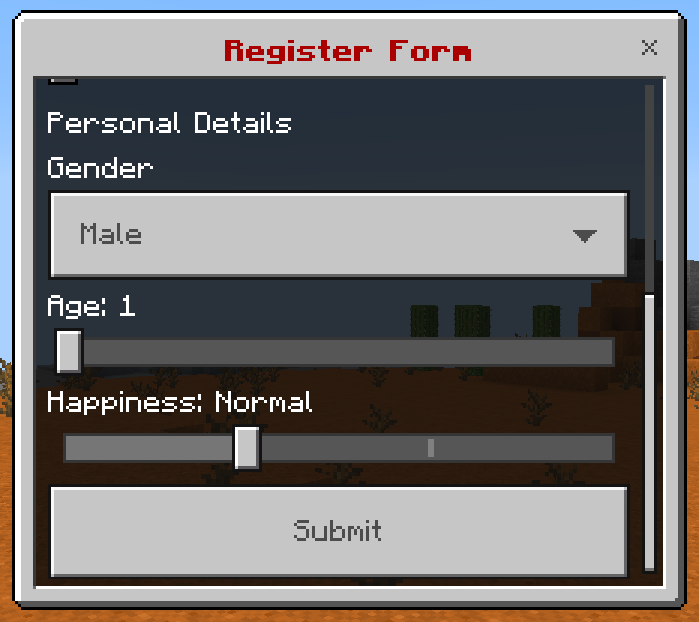
This is a complex form with a list of input components.
Format
Menu
yaml
menu-settings:
  menu-type: custom-form

  # The title of the form
  title: <name>

  # The actions when the player opens the form
  open-action:
  - action
  - action
  - action
  ...

  # The actions when the player closes the form
  close-action:
  - action
  - action
  - action
  ...

  # The actions when the player does something invalid in the form
  invalid-action:
  - action
  - action
  - action
  ...

  # The actions when the player is not a Bedrock player
  java-action:
  - action
  - action
  - action
  ...

  # The requirement before the player can open the form
  view-requirement:
    <requirement-set>
    <requirement-set>
    <requirement-set>
    ...

  # The permission required to open the form
  permission: bettergui.test

  # The command to open the form
  command:
  - command1
  - command2
  ...

  # The list of argument processors to process the arguments of the command to open the form
  argument-processor:
    <argument-processor>
    <argument-processor>

# The components
component1:
  <setting>

component2:
  <setting>

component3:
  <setting>
Component
Label
yaml
component:
  type: label

  # The component text
  text: <text>
Input
yaml
component:
  type: input

  # The component text
  text: <text>

  # The placeholder when there is no value in the input
  placeholder: <placeholder>

  # The default text
  default: <text>
Dropdown
yaml
component:
  type: dropdown

  # The component text
  text: <text>

  # The options
  option:
  - text1
  - text2
  - text3
  ...

  # The index of the option to choose as the default option
  default: <index>
Slider
yaml
component:
  type: slider

  # The component text
  text: <text>

  # The minimum value
  min: <value>

  # The maximum value
  max: <value>

  # The step
  step: <value>

  # The default value
  default: <value>
Step Slider
yaml
component:
  type: step

  # The component text
  text: <text>

  # The options
  option:
  - text1
  - text2
  - text3
  ...

  # The index of the option to choose as the default option
  default: <index>
Switch
yaml
component:
  type: switch

  # The component text
  text: <text>

  # The default value
  default: <true/false>
Submit Button
yaml
button1:
  type: submit

  # The component text
  text: <text>

  # The actions when clicking the button
  action:
  - action
  - action
  - action
  ...

  # The requirement to check when clicking the button
  click-requirement:
    <requirement-set>
    <requirement-set>
    <requirement-set>
    ...
Note
Menu Settings
open-action: the Action when the menu is opened.close-action: the Action when the menu is closed.invalid-action: the Action when the player does something invalid.java-action: the Action when the player is not a Bedrock player.view-requirement: the Requirement to check before opening the menu. If it is not met, the menu will not be opened.argument-processor: the Argument Processor to handle the arguments of the command to open the menu.
Component
action: the Action when the button is clicked.click-requirement: the Requirement to check when the button is clicked. If it is not met, theactionwill not be executed.
Variable
You can get the value of the component by using the format {form_<component>}, where <component> is the name of the component in the config. For example, use {form_username} to get the value of the component named username.
Example
yaml
menu-settings:
  menu-type: custom-form
  command: customform
  title: "&4&lRegister Form"

user-label:
  type: label
  text: User Details

username:
  type: input
  text: "Username"
  placeholder: "Your username here..."
  default: "{player}"

password:
  type: input
  text: "Password"
  placeholder: "Yout password here..."

remember:
  type: switch
  text: "Remember"

personal-label:
  type: label
  text: Personal Details

gender:
  type: dropdown
  text: Gender
  option:
  - "Male"
  - "Female"
  - "Other..."
  default: 0

age:
  type: slider
  text: Age
  min: 0
  max: 100
  step: 1
  default: 1

happiness:
  type: step
  text: Happiness
  option:
  - Sad
  - Normal
  - Happy
  - Feeling Lucky
  default: 1

submit:
  type: submit
  action:
  - "tell: &eUsername: &f{form_username}"
  - "tell: &ePassword: &f{form_password}"
  - "tell: &eGender: &f{form_gender}"
  - "tell: &eAge: &f{form_age}"
  - "tell: &eHappiness: &f{form_happiness}"
  click-requirement:
    remember-check:
      condition: "{form_remember}"
      fail-action: "tell: &cYour form is lost..."